Release to a few users before you release to everyone.
ShipSwitch is a feature flag service. You wrap a new feature in a condition in your code, then decide from the dashboard who gets it: one environment, a share of your users, or only the ones you pick. When something breaks, you turn it off, without redeploying.
- Hosted in France
- None of your users' data is stored
- Free to start, no card
Your code asks
productionflags.isEnabled('new-checkout', user)ShipSwitch answers, for each of your users
1 user of 40 gets the new feature
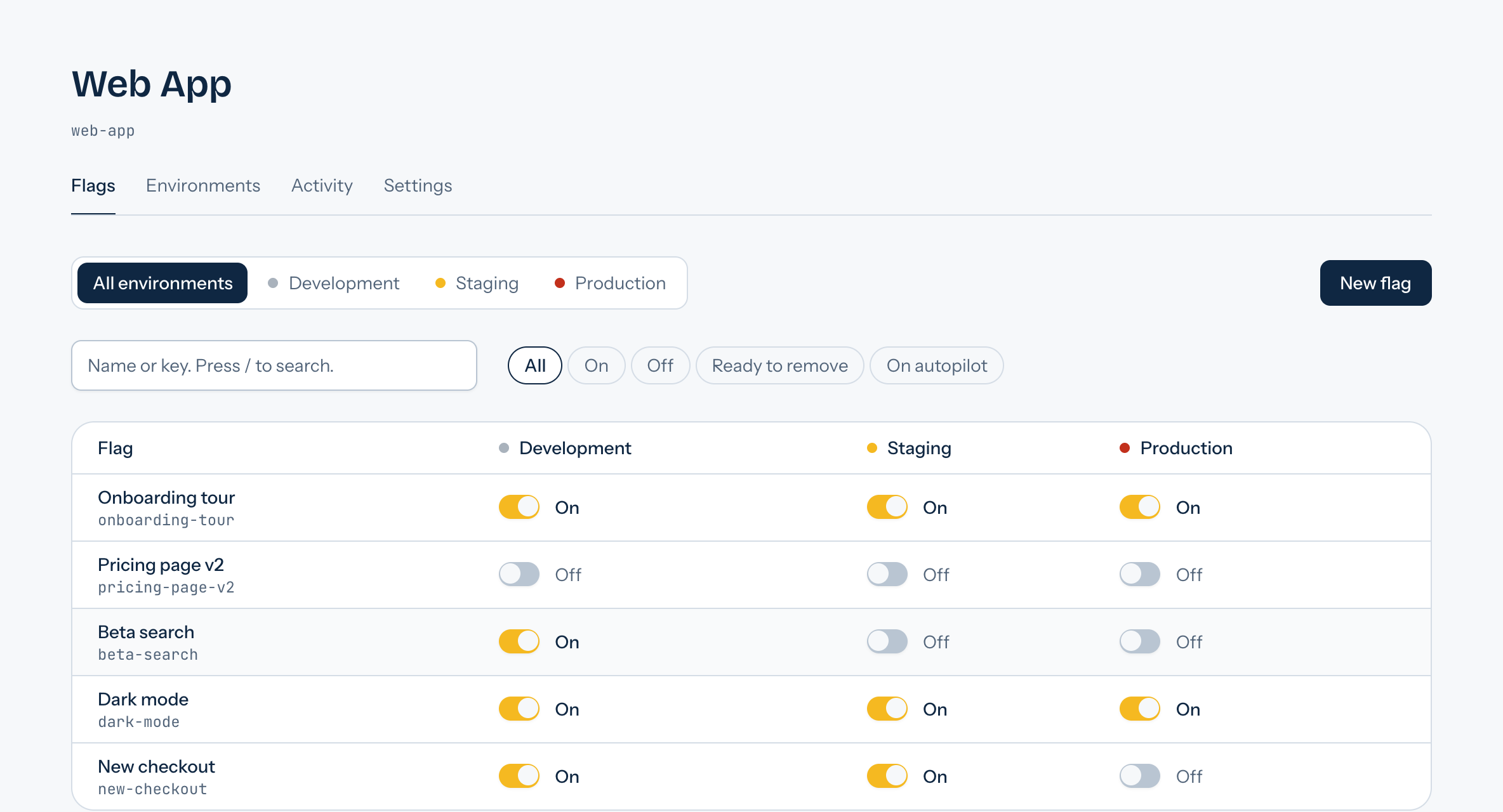
Every flag, in every environment, on one screen
This is the dashboard itself, not a mock-up: what is on in staging and not yet in production shows at a glance.
Try it: who gets the feature, and why
Each pennant is one user, evaluated by the engine the API runs. Change the settings, then select a user to read the reason for their answer.
new-checkoutproduction40 of your users. Select one to see what your code receives.
5 users of 40 get the new checkoutPremium
await flags.isEnabled('new-checkout', {
  userId: 'user_8',
  subscription: 'FREE',
});
// true
user_8
on
This user is in the rollout, on every request.
From a risky release to a reversible one
- 1
Create a flag
Give it a key your code will ask for. It starts turned off in every environment, so creating it changes nothing for anyone.
- 2
Ask before showing the feature
One call to the SDK. It answers from a local cache, and falls back to the value you chose if ShipSwitch cannot be reached: it never throws into your application.
- 3
Open it gradually
Staging first, then 5% of production, then everyone. Each step is a switch in the dashboard, and so is going back.
What is in the box
Ship gradually
- Stable percentage rollouts
- A user stays on the same side from one request to the next, and raising the percentage only ever adds users.
- Targeting rules
- Conditions on any attribute you send: plan, country, email domain, account age. The first rule a user matches decides.
- More than on and off
- Boolean, string, number and JSON flags: a variant name, a limit, or a whole configuration, checked against the flag's type.
- Changes on a schedule
- Turn a flag on, off, or set its percentage at a date and time. It applies by itself and shows in the history under the name of who planned it.
Stay in control
- Live updates
- An application that keeps a connection open sees a change within a second, instead of waiting for its cache. Turning a flag off is immediate.
- An audit log you cannot edit
- Who changed what, when, and what the value was before. Written with the change itself, readable by the whole team.
- Why this user sees that
- Type a user id and its attributes: ShipSwitch says what that user gets and which rule or percentage decided.
- Flags that do not pile up
- See how often each flag is asked for, which ones have settled for a month, and the files and lines of your code that still mention them.
Work as a team
- Roles for a team
- Owners, admins, developers and viewers, invited by email. Organizations are isolated from each other on every request.
- A second pair of eyes
- Require approval in the environments you choose: a change is proposed by one member and applied when another approves. Copy a reviewed setup from staging to production in one step.
- Slack and webhook notifications
- Each change to a flag, and each move of the autopilot, lands in a Slack channel or at an address of yours, as a signed JSON document.
- Keys safe to ship
- Client keys only read values: rules and percentages never leave the server. Keys are shown once, stored hashed, and revoked in one click.
new-checkoutproduction- Users with the feature
- 5%
- Users in error
- 0.4%
Step 1 of 4: all good, moving on.
An autopilot that opens the flag, and closes it when things go wrong
Choose the steps and how long to stay on each: ShipSwitch moves the flag forward by itself. When the feature fails for a user, your code says so with one call (reportError in the SDK, or an HTTP request). Too many reports, and the flag is turned off before most users are affected.
- Steps on a schedule
- 5%, 25%, 50%, then everyone, or the plan you prefer. No one has to stay up to move the slider.
- Automatic rollback
- Above the share of users in error that you set, the flag goes back to off and your team gets an email.
- You stay in control
- Stop it at any time. A change made by hand always wins over the autopilot.
Included in the Pro and Business plans.
Three methods, and no way to break your app
The TypeScript SDK has no dependencies and runs in Node.js and in the browser. Flags are evaluated on the server, so your rules never ship to your users.
- One request per user
- Values are cached per user, and concurrent reads share a single request.
- It never throws
- If ShipSwitch is slow or unreachable, you get the last known value, then the default you chose.
- Typed values
- A flag that changed type cannot surprise you: you get your default instead.
import { ShipSwitch } from '@shipswitch/sdk';

const flags = new ShipSwitch({
  apiKey: process.env.SHIPSWITCH_KEY,
});

const user = { userId: 'user_123', plan: 'premium' };

// A boolean flag: on or off for this user.
if (await flags.isEnabled('new-checkout', user)) {
  renderNewCheckout();
}

// Any value, with the default to use if it cannot be read.
const limit = await flags.getValue('max-items', 20, user);

// Every flag of the environment for this user, in one call.
const all = await flags.getAllFlags(user);
Questions people ask before they start
What happens to my application if ShipSwitch is down?
It keeps working. Your code gives each flag a default value, used when ShipSwitch does not answer, and the SDKs fall back on the last values they knew. A flag service must never be the reason your application is down.
Where is my data, and what do you keep about my users?
The service is hosted in France. The identifiers and attributes your application sends are used to compute the answer and are not stored.
How long does it take to set up?
A few minutes for the first flag: create it, create an API key, and read it. One HTTP request is enough, with nothing to install, and examples exist for JavaScript, Python, PHP, Go and Java. The TypeScript SDK adds the cache and the fallback to your default values.
What happens if I stop paying?
Your organization goes back to the free plan and nothing is deleted. Your applications keep receiving their flags. Paid features stop, and if you have more than the free plan includes, the dashboard is read-only until you are back within its limits.
Do I pay per user?
No. The price is per organization, whatever the size of your team, and the free plan has no time limit.
Can I leave easily?
Yes. Flags are read over a plain HTTP API, your code keeps its default values, and you can delete your organization and its data yourself at any time.
A free plan to start, a fixed price when you grow
No per-seat pricing: your bill does not change when your team does.
Free
To try ShipSwitch on a real project.
0 €
- 1 project
- 3 members
- 10 feature flags
- Percentage rollouts and targeting rules
- Environments and API keys
- Scheduled changes, live updates and usage tracking
- 7 days of audit log
Pro
For a team that ships every week.
19 €
per month
- 5 projects
- 10 members
- Unlimited feature flags
- Percentage rollouts and targeting rules
- Environments and API keys
- Scheduled changes, live updates and usage tracking
- Slack and webhook notifications
- Approvals per environment
- Autopilot with automatic rollback
- Management keys for scripts and CI
- Code references from your CI
- 90 days of audit log
Business
For several teams and products.
79 €
per month
- Unlimited projects
- Unlimited members
- Unlimited feature flags
- Percentage rollouts and targeting rules
- Environments and API keys
- Scheduled changes, live updates and usage tracking
- Slack and webhook notifications
- Approvals per environment
- Autopilot with automatic rollback
- Management keys for scripts and CI
- Code references from your CI
- 1 year of audit log
Prices exclude VAT. One price per organization, whatever its size.
The plans, line by line
| What is included | Free | Pro | Business |
|---|---|---|---|
| Projects | 1 | 5 | Unlimited |
| Members | 3 | 10 | Unlimited |
| Feature flags | 10 | Unlimited | Unlimited |
| Audit log | 7 days | 90 days | 1 year |
| Percentage rollouts, targeting rules, environments | Included | Included | Included |
| Scheduled changes, live updates, usage tracking | Included | Included | Included |
| Test a user, copy between environments | Included | Included | Included |
| Autopilot with automatic rollback | Not included | Included | Included |
| Approvals per environment | Not included | Included | Included |
| Slack and webhook notifications | Not included | Included | Included |
| Management keys and code references | Not included | Included | Included |
Make your next release a quiet one
Create an account, a project and a first flag in a couple of minutes. Free to start, no card needed.
Create an account